
The Best 6 Screenshot Tools of 2026
Capture and Record your Screens with Ease
Screen recording software is indispensable in 2026. It is used for business communication, content creation, and online education. With this guide, we help you compare the best screen recording tools based on functionality, ease of use, and price.
Discover the best free screen recording apps of 2026 that allow you to capture and edit your screen effortlessly. Add annotations, share with a single click, and use advanced text recognition features to work even faster.
Here is our list of the top 6 screen recording tools of 2026

1. Fenêtre Capture Tool
The Fenêtre Capture Tool is our top choice for 2026, and for good reason!
This free screen recording app for Windows is the perfect addition to your standard Windows toolset. Through its intuitive interface, you can choose from eight different capture options that support both screenshots and screen recordings. You can record a specific area, a full screen, or even multiple screens at once.
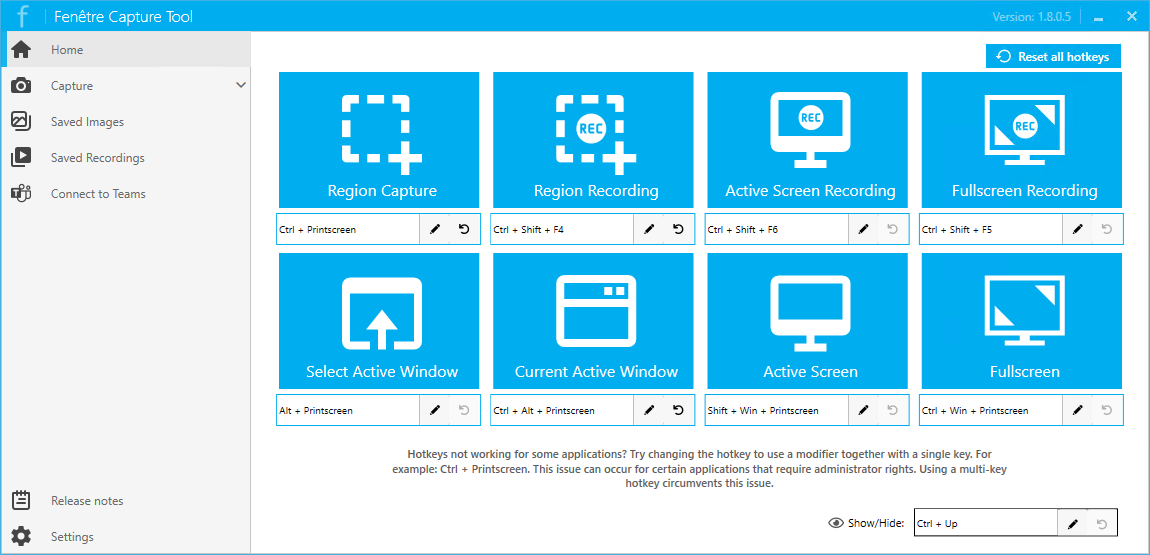
What truly sets the Fenêtre Capture Tool apart is its powerful feature set combined with a user-friendly design. There is no steep learning curve, and everything works exactly as you would expect. Using the built-in editor, you can add annotations, text, and arrows in just a few clicks, or blur sensitive information in your captures.
Thanks to text recognition (OCR), you can extract text from images or PDFs and convert it into editable content, even when the text is not normally selectable. This eliminates the need for retyping.
This combination of features makes the tool ideal for creating instruction manuals, documenting software bugs, or quickly sharing information with colleagues and friends. With seamless Microsoft Teams integration, you can share your screen recordings instantly, making collaboration faster.
In addition, the screen recording functionality supports both input and system audio. This makes it perfect for quick tutorials, video explanations, and gameplay recordings.
Link: Fenêtre Capture Tool
Price: Free
2. Snipping Tool (Windows)
The Windows Snipping Tool is a true classic and comes pre-installed on almost every Windows computer. This familiar screen capture tool remains a reliable option for quick and simple screenshots.
Using the interface, you can easily capture rectangular, free-form, or window-based screenshots. Images can be saved in multiple file formats. The Snipping Tool also offers basic editing features such as highlighting and annotations. Screenshots can then be opened directly in Paint or Clipchamp for further editing.
Because this screen capture app is already installed by default, you can start using it immediately without downloading any additional software.
Link: Snipping Tool (Windows)
Price: Free
3. Lightshot
Looking for a lightweight and fast screen capture app for Mac? Lightshot is an excellent choice. With this tool, you can quickly select a portion of your screen and instantly share or save the image.
Lightshot is available for both Mac and Windows and is well known for its simplicity. Thanks to its easy editing tools and fast sharing options, it is especially popular among users who want to capture and send screenshots efficiently.
Link: Lightshot
Price: Free
4. Greenshot
Greenshot is an open-source screen capture app with a powerful feature set designed for technical and business teams. Its built-in editor allows you to easily add annotations, text, and shapes. This makes it especially suitable for bug reports and project documentation.
Greenshot is also available for macOS. In 2025, a new stable release of this screen capture tool was published. Newer unstable versions are also available through the official website.
Link: Greenshot
Price: Windows: free, Mac: $1,99
5. Snagit
Snagit by TechSmith is a professional screen capture tool aimed primarily at business users. This is reflected in its extensive features and thoughtful design. The tool includes a built-in library and makes it easy to share recordings using shareable links.
With its advanced editing options, you can effortlessly add annotations, effects, and voice-overs. Thanks to integrations with various platforms, Snagit is especially popular among teachers, trainers, and content creators who produce professional tutorials and documentation.
Snagit offers multiple licensing options, including special pricing for education.
Link: Snagit
Price: Starts at € 42,91 a year
6. ShareX
The list concludes with ShareX. This tool is particularly favored by advanced users and power users. Since its first release in 2007, ShareX has been continuously developed and has grown into one of the most versatile free screen recording tools available.
ShareX supports nearly all capture methods, including screen regions, specific windows, full-screen captures, and scrolling screenshots. Beyond capturing, it also offers advanced features such as automatic uploads, visual effects, and QR code scanning.
Thanks to these extensive capabilities, ShareX is an excellent choice for users who want maximum control over their screen recordings.
Link: ShareX
Price: Free, donating is possible
The Top Screen Recorders of 2026
Whether you are creating presentations, reporting bugs, or developing creative content, these top 6 screen recording apps of 2026 offer a solution for every use case. Choose the tool that best fits your workflow and create professional screen recordings throughout the year.
Ready to start recording your screen(s)?
Download the number one tool for free and experience just how easy screen recording can be!